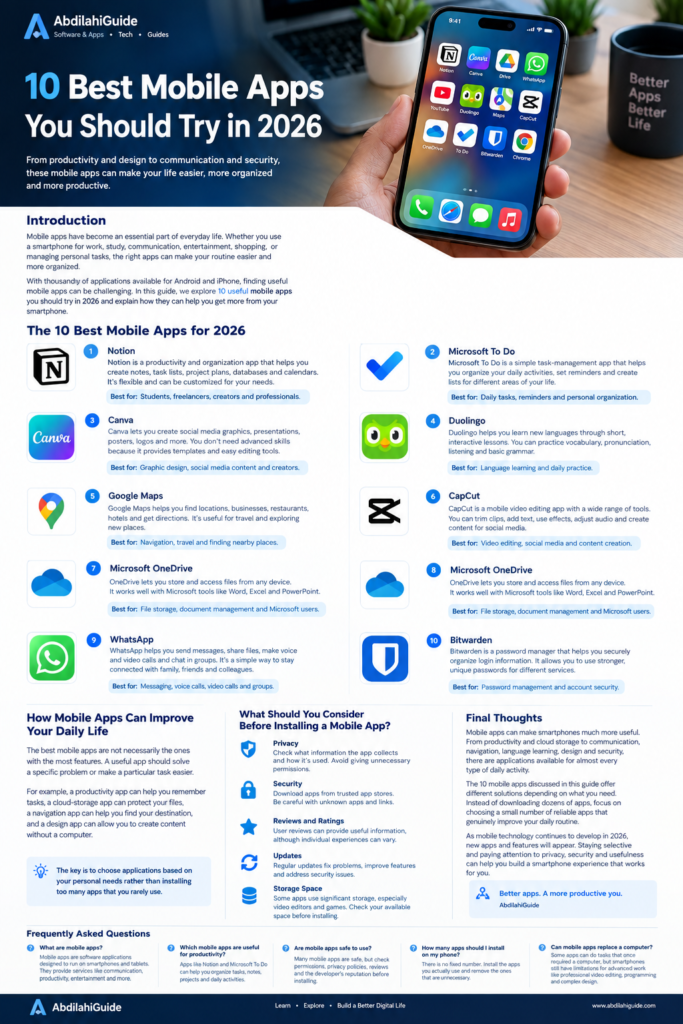
Mobile applications have transformed into a necessity of today’s life. It doesn’t matter whether you require a smartphone for work, studies, communication, fun, shopping or doing household chores—the right kind of applications can help you in making life more convenient.
There are many applications available for Android and iPhone which could be useful, but it might be troublesome to find the right ones. There are apps that help you manage your time and some that improve your performance.
In this article, you’ll find a list of 10 useful mobile applications to try out in 2026 and learn how useful they might be for you.
1. Notion
Notion app is a well-known productivity and organization application designed for those who want to store all their personal and work information at one location.
You can use Notion to create notes, lists, plans, data bases, calendars, and personal study systems. It can help students manage their lessons, and freelancers and business people organize their projects and vital information.
Flexibility is one of its strongest features, as users can build their workspaces based on their requirements rather than a unique structure.
2. Microsoft To Do
Microsoft To Do is a straightforward task management tool designed for organizing an individual’s everyday life. Users can create tasks, set reminders and due dates, and categorize tasks by creating lists.
For example, you can set up different lists for work, school, groceries, personal activities, and so on.
Microsoft To Do has been designed for users who only need basic assistance to keep in mind their essential tasks.
3. Canva
Canva is one of the best design apps for mobile devices. This app makes it possible to design social media images, presentations, posters, thumbnails, flyers, logos, or any other visual material.
You can begin to use Canva without advanced graphic design skills. The app allows everyone to create professional designs thanks to its easy-to-use templates and editing tools.
When it comes to small businesses and content creators, mobile design apps are especially useful because they help create and edit designs on the spot with smartphones
4. Google Drive
Google Drive is a cloud storage solution that makes it possible for users to upload files that can be accessed from any device.
You can upload different types of files like text documents, videos, images, PDFs, or many others to be accessed from anywhere and at any time as long as you have an active internet connection.
Access to files is also configured to allow sharing with other users, which is convenient for those who must work collaboratively.
Google Drive is a good option for students for storing documents, professionals to use in their work with papers, and anyone needing some space for back up.
5. Google Maps
Google Maps can be defined as more than a simple navigation app that allows someone to search locations, business, eatery/restaurants, hotels, and other places.
The app can give directions for various modes of transport and can be especially helpful when in a city unknown to the user.
For tourists, Google Maps can additionally make it easier to check nearby places on-site before they arrive.
6. Duolingo
Acquiring proficiency in a new language can be an uphill task when there is no instructor or language school available. Duolingo offers a suitable option to learn languages by engaging in fun and interactive lessons.
With the help of Duolingo, users can take part in exercises that enable them to learn vocabulary, talking, listening, and basic grammar in a painless way.
Lessons are quick so users can practice on a regular basis without having to necessary dedicate much time.
Good for: Language learning and practicing on a daily basis.
7. Microsoft OneDrive
OneDrive from Microsoft is a great application for users who are using smartphones for cloud storage. It gives users the opportunity to store files over the web and access them afterward from any kind of device including computers, tablets, and phones.
OneDrive is worthy of attention, particularly for those who utilize Microsoft’s tools such as Word, Excel, and PowerPoint.
Preserving key files inside the cloud storage also helps minimize the risk of files being lost in case of the damage of a smartphone or a computer.
Best suited for: File storage, management of documents, and Microsoft users.
8. CapCut
Those who want to edit videos on their mobile devices will find plenty of useful options in CapCut.
With this application, it is possible to cut video segments, insert text, use transitions, apply filters, edit sound, and create videos for social networks.
Mobile video editing has only become more widespread as many people who produce videos are doing it directly on their phones instead of computers.
It is primarily designed for video editing and creating material for social networks.
9. WhatsApp
WhatsApp is still a significant communication tool for many mobile users globally.
It enables users to send messages, photos, and files, make voice and video calls, and chat in groups.
It serves families, friends, students, and businesses with a great way to easily connect without using the traditional SMS services.
Suitable for: Messaging, voice calling, video calling, and groups.
10. Bitwarden
Keeping track of all your passwords can be challenging, especially if you have several online accounts. Fortunately, Bitwarden is a password-management tool that helps individuals keep their usernames and passwords organized securely.
Rather than remembering so many different passwords, users can save them all in a password manager and create more secure ones.
It is essential to use different passwords for significant accounts in terms of online safety.
Best for: Password management and account protection.
How Mobile Apps Can Improve Your Daily Life
The most effective mobile applications are not those having the most functions. To be effective, an application must have a specific function.
For instance, a productivity application will remind you of important tasks while a cloud storage application will keep your documents safe. Navigation application will assist you in reaching your destination and a graphic design application will create designs for you from your phone.
It is important to choose applications according to your own needs and not to install all the apps you never use.
What Should You Consider Before Installing a Mobile App?
It is important to study several important aspects before installing an application on your device.
Confidentiality
Find out what type of data is collected by the application and its possible uses. Choose only apps that don’t require you to grant them unnecessary permissions.
Safety
When possible, avail trusted app stores. Be cautious while downloading unknown apps.
Comments and Ratings
Read user feedback to learn more about how the app performs.
Improvements
Updating applications helps enhance performance, solve issues, and improve security related concerns. It is usually better to keep any important application updated.
Free Storage
Some apps take a lot of storage space, especially video editing and gaming softwares. Make sure to check if there is enough free storage before downloading the application.
Conclusion
Mobile applications allow people to use smartphones to their maximum potential. Applications are used for productivity, storage, communication, navigation, language learning, designing and security purposes.
These 10 mobile applications described in this article have a unique feature in that they can be used for various purposes depending on what your smartphone is employed for. It’s usually better to have 4 or 5 trustworthy applications that can make your life easier than hundreds of applications installed on your smartphone.
As mobile technology continues to expand in 2026, the number of smart phone applications and the features they provide will increase as well. Choosing apps careful and staying aware of your privacy and safety will help you achieve the best mobile experience possible.
FAQ What are mobile applications
What mobile applications are beneficial when it comes to productivity?
Applications like Notion and Microsoft To Do are certain mobile apps that help users in managing tasks, notes, projects, and daily activities.
Are mobile applications secure for usage?
Most mobile applications are secure but people should always check for permissions, privacy policies, reviews, and credibility of the creator of the application prior to downloading.
How many mobile applications are appropriate to install on the phone?
There is no certain number for applications that you can install on your phone, but in general, it would be better if you will download the applications that you use from time to time and uninstall the applications that you do not need or use very rarely.
Can certain mobile apps replace a computer?
There are mobile apps that can perform certain functions that computers used to do but there are still limitations when it comes to smartphones, for instance, in such spheres as video editing or programming.
also there is another apps you can can use so that help you save alot of your time easily https://abdilahiguide.com/best-video-and-photo-editing-software/