
Using the internet has become an essential part of everyday life.
in this particular content am gonna share with you 10 Best VPNs for Privacy, Security, and Safer Browsing in 2026. People use the web for work, education, online banking, entertainment, communication, and shopping. However, browsing the internet can also expose information such as your IP address, approximate location, and network activity.
A VPN (Virtual Private Network) can help improve online privacy by creating an encrypted connection between your device and a VPN server. This can be especially useful when using public Wi-Fi networks or accessing the internet while traveling.
With many VPN services available today, choosing the right one can be difficult. In this guide, we look at some of the best VPNs to consider in 2026 and explain the features that can help you choose a service based on your needs.
What Is a VPN?
A VPN, or Virtual Private Network, is a service that creates an encrypted connection between your device and the internet.
Normally, when you connect to a website, your internet connection is handled directly through your internet service provider. A VPN routes your connection through a VPN server before it reaches the wider internet.
This can help hide your real IP address from websites and encrypt traffic between your device and the VPN server.
However, a VPN does not make you completely anonymous online. Websites can still use cookies, browser fingerprinting, account information, and other technologies to identify or track users.
How Does a VPN Work?
When you connect to a VPN, the service generally performs three main functions:
1. Encrypts Your Internet Traffic
A VPN encrypts traffic between your device and the VPN server. This can make it more difficult for someone on the same network to inspect your connection.
2. Changes Your Visible IP Address
Websites normally see the public IP address associated with your connection. When using a VPN, websites generally see the VPN server’s IP address instead.
3. Routes Your Connection Through a VPN Server
Your internet traffic is sent through a VPN server before reaching its destination. Depending on the service and server location, this can make it appear that you are connecting from a different location.
Why Should You Use a VPN?
There are several reasons people choose to use a VPN.
Protect Your Privacy on Public Wi-Fi
Public Wi-Fi networks in airports, hotels, cafés, and other locations can present additional security risks. A VPN can encrypt your connection between your device and the VPN server, providing an additional layer of protection.
When comparing the Best VPNs for privacy, look closely at each provider’s privacy policy.
Improve Online Privacy
A VPN can prevent your local network from easily seeing the contents of encrypted VPN traffic. It can also hide your IP address from websites you visit.
Secure Remote Connections
People who work remotely may use VPN services to add protection when connecting to the internet outside their home or office.
Access the Internet While Traveling
Travelers may use VPNs when connecting through unfamiliar networks. However, VPN use does not override local laws, website rules, or service restrictions.
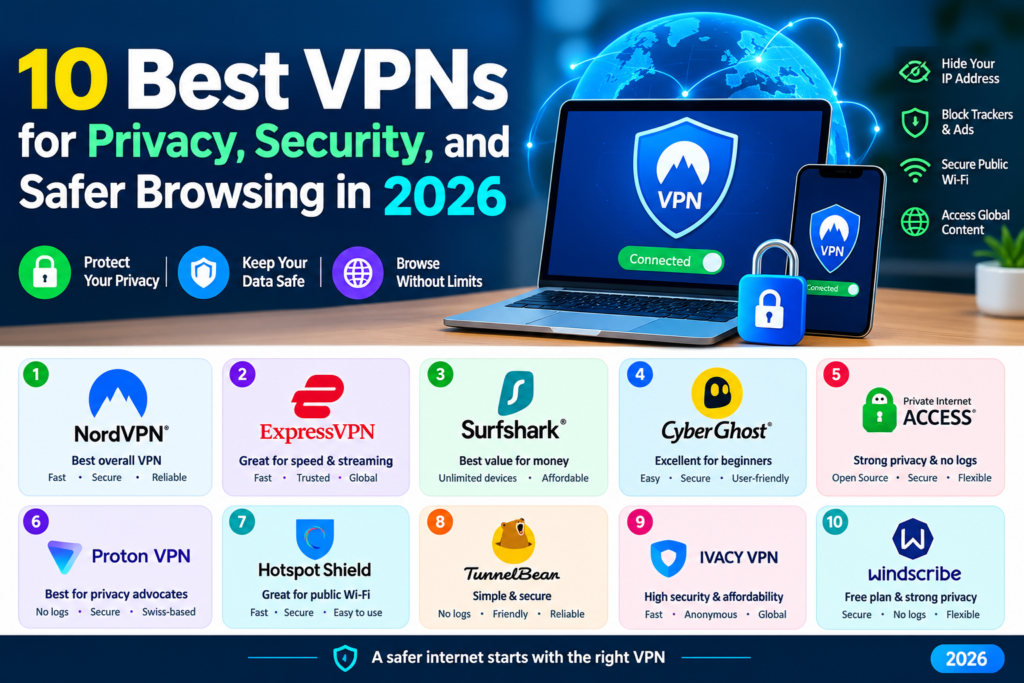
10 Best VPNs to Consider in 2026 (10 Best VPNs for Privacy, Security, and Safer Browsing in 2026)
The best VPN for you depends on factors such as privacy features, connection speeds, server availability, supported devices, price, and ease of use.
Here are ten well-known VPN services worth considering.
1. NordVPN
NordVPN is one of the most widely recognized VPN services. It offers encrypted connections, a large network of servers, and applications for major operating systems and devices.
The service also includes additional security features designed to provide more control over internet connections.
Best for: Users looking for a feature-rich VPN service.
2. ExpressVPN
ExpressVPN focuses on ease of use and straightforward VPN connections. Its applications are designed for users who want to connect to a VPN server without dealing with complicated configuration.
It supports multiple platforms and provides a wide selection of server locations.
Best for: Beginners who want a simple VPN experience.
3. Surfshark
Surfshark is known for supporting multiple devices under one subscription. This can be useful for households or users who own several devices such as smartphones, laptops, tablets, and smart TVs.
It also provides several privacy and security features.
Best for: Users who want to protect multiple devices.
4. Proton VPN
Proton VPN is developed by Proton, a company known for privacy-focused services. Its VPN service provides encrypted connections and includes a free plan with certain limitations.
Proton VPN can be an interesting option for users who want a privacy-focused provider and prefer having a free tier available.
Best for: Privacy-conscious users and people looking for a free VPN option.
5. CyberGhost VPN
CyberGhost VPN provides applications for several platforms and offers a large selection of VPN servers.
Its interface is designed to make selecting a server relatively straightforward, making it suitable for users who are new to VPN software.
Best for: Users who want an easy-to-use VPN with many server locations.
6. Private Internet Access
Private Internet Access, often called PIA, is a long-established VPN provider. It offers applications for multiple platforms and provides users with a range of configurable privacy and security settings.
Its interface provides more control for users who want to adjust their VPN connection.
Best for: Users who want more configuration options.
7. Mullvad VPN
Mullvad is a privacy-focused VPN provider known for its approach to user privacy. It uses an account-number system rather than requiring users to create a traditional username-based account.
The service also provides applications for several major platforms.
Best for: Users who place a strong emphasis on privacy.
8. Windscribe
Windscribe provides VPN applications for computers and mobile devices and offers both free and paid options.
Its free plan can be useful for people who want to test a VPN before paying for a subscription, although free plans generally have limitations compared with premium services.
Best for: Users who want to try a VPN without immediately purchasing a subscription.
9. IPVanish
IPVanish is another established VPN service offering applications for multiple devices. It provides encrypted VPN connections and allows users to select from available server locations.
The service can be considered by users looking for a conventional VPN application with multiple platform options.
Best for: Users looking for a multi-device VPN service.
10. hide.me VPN
hide.me provides VPN applications for major operating systems and offers both free and premium plans.
Its free option can make it useful for users who want to explore basic VPN functionality before deciding whether they need a paid subscription.
Best for: Users interested in testing VPN features with a free plan.
Important Features to Look for in a VPN
Choosing a VPN should involve more than simply looking at the number of servers. Consider the following features before subscribing.
Strong Encryption
Look for a VPN that uses modern encryption and secure VPN protocols. Strong encryption helps protect data while it travels between your device and the VPN server.
No-Logs Policy
A VPN provider may advertise a “no-logs” policy, meaning it claims not to store certain information about users’ online activities.
However, no-logs policies can differ between providers. Read the provider’s privacy policy and, where available, look for independent audits or other evidence supporting its claims.
VPN Protocols
Modern VPN services may support protocols such as WireGuard, OpenVPN, and IKEv2.
Different protocols can offer different combinations of speed, security, and compatibility.
Server Locations
A larger server network can provide users with more connection options. However, the number of servers alone does not necessarily determine the quality of a VPN.
Device Compatibility
Check whether the VPN supports the devices you use regularly, such as Windows PCs, Macs, Android phones, iPhones, tablets, and routers.
Connection Speed
VPN encryption and routing can affect internet performance. A good VPN should provide enough speed for activities such as browsing, video calls, streaming, and downloading.
Kill Switch
A kill switch can automatically block internet traffic if the VPN connection unexpectedly disconnects.
This feature can help prevent your device from continuing to access the internet without the VPN connection.
Free VPN vs. Paid VPN
Free VPNs can be attractive because they do not require a subscription. However, they often come with limitations such as restricted server locations, data limits, fewer features, or slower connections.
Paid VPN services generally provide more features, additional server choices, and higher usage limits.
Before choosing a free VPN, check how the provider makes money and carefully review its privacy policy. A VPN provider should not be trusted simply because its application is free.
Are VPNs Completely Private?
No VPN can make you completely anonymous on the internet.
A VPN can hide your IP address from websites and encrypt traffic between your device and the VPN server, but it does not prevent every form of online tracking.
For example, websites may still identify you when you sign into an account. Cookies, browser fingerprinting, advertising networks, and other technologies can also be used to track activity.
For better privacy, combine a reputable VPN with good security practices such as strong passwords, two-factor authentication, updated software, and careful control of browser permissions.
Can a VPN Make Your Internet Faster?
Usually, a VPN does not make your internet connection faster.
Because VPN traffic has to travel through an additional server and is encrypted, using a VPN can sometimes reduce connection speed.
However, the difference can vary depending on the VPN provider, server location, internet connection, VPN protocol, and distance between you and the VPN server.
Are VPNs Legal?
VPN laws vary from one country to another.
In many countries, using a VPN is legal. However, some countries regulate or restrict VPN services.
Using a VPN also does not make illegal activities legal. Users should understand the laws and regulations that apply in their country before using a VPN.
How to Choose the Right VPN
The right VPN depends on your individual needs.
If you are primarily interested in privacy, look closely at the provider’s privacy policy, logging practices, security features, and independent audits.
If you travel frequently, consider server availability and performance in the countries where you travel.
If you have several devices, check the number of simultaneous connections supported by the service.
If your budget is limited, compare free and paid plans carefully and pay attention to data limits and available features.
VPN Safety Tips
A VPN is only one part of online security. For better protection, follow these practices:
Before downloading one of the Best VPNs, make sure you are using the provider’s official website.
- Download VPN applications from the provider’s official website or trusted app stores.
- Keep your VPN application updated.
- Use strong and unique passwords.
- Enable two-factor authentication where available.
- Avoid downloading suspicious files.
- Keep your operating system and browser updated.
- Review the VPN provider’s privacy policy.
- Avoid relying on a VPN as your only security measure.
- Be careful when entering sensitive information on unfamiliar websites.
Frequently Asked Questions About VPNs
What is the best VPN for privacy?
There is no single VPN that is best for every user. When privacy is the priority, compare the provider’s logging policy, security practices, jurisdiction, independent audits, and transparency.
Can a VPN hide my IP address?
Yes. When connected to a VPN, websites generally see the VPN server’s IP address instead of the public IP address assigned to your normal internet connection.
Does a VPN protect me from viruses?
No. A VPN primarily protects the network connection. It does not replace antivirus software or protect you from every malicious file, website, or application.
Can I use a VPN on my phone?
Yes. Most major VPN providers offer applications for Android and iOS devices.
Are free VPNs safe?
Not necessarily. Some free VPN services can be useful, but users should research the provider’s privacy practices, limitations, and business model before using one.
Does a VPN make me anonymous?
No. A VPN can improve privacy and hide your IP address, but it does not make you completely anonymous online.
Final Thoughts
A VPN can be a useful privacy and security tool for people who regularly use public Wi-Fi, travel, work remotely, or simply want an additional layer of protection for their internet connection.
The best VPN for one person may not be the best choice for another. Before subscribing, compare privacy policies, security features, connection speeds, server locations, supported devices, pricing, and independent audits.
Most importantly, remember that a VPN is only one part of online security. Combining a reputable VPN with strong passwords, two-factor authentication, updated software, and careful browsing habits can provide a more comprehensive approach to protecting your digital privacy.
also there is another apps you can can use so that help you save alot of your time easily https://abdilahiguide.com/wp-admin/post.php?post=450&action=edit

2 Responses