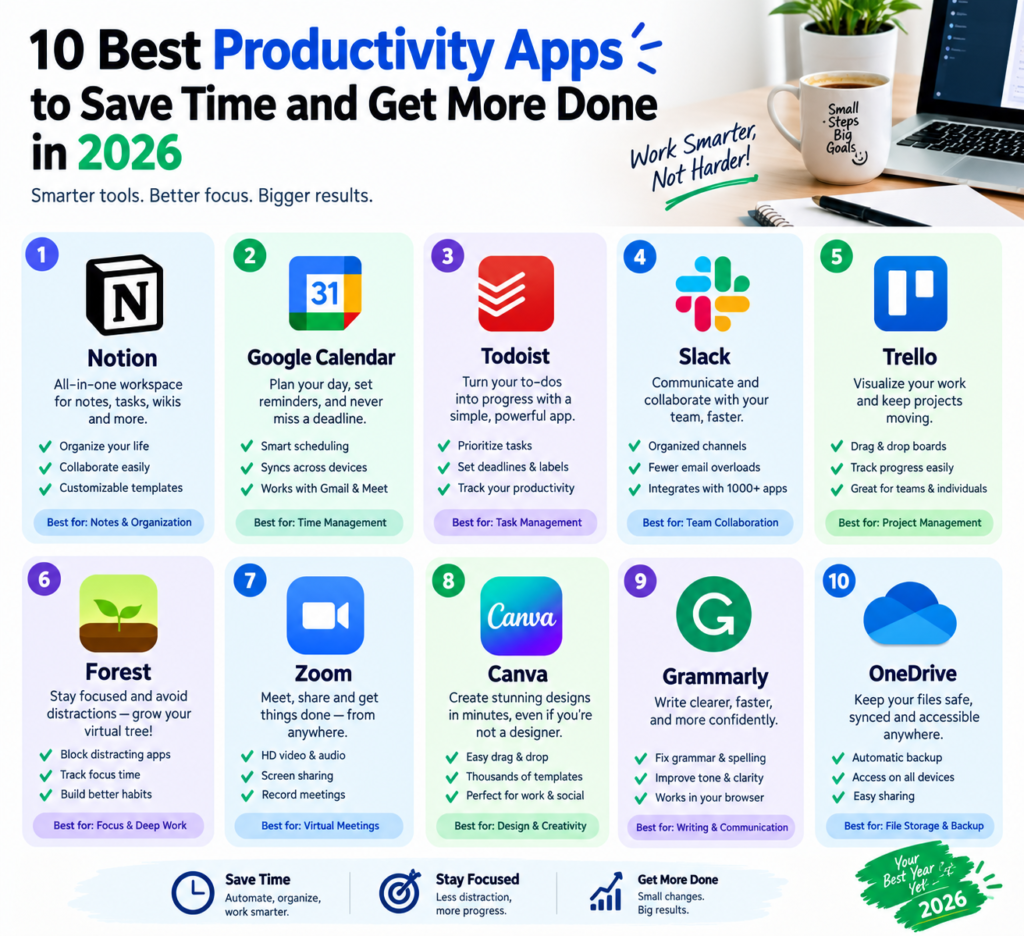
in this particular content am gonna share with you Best Productivity Apps In today’s digital world, staying productive is not always about working harder. The right productivity apps can help you organize your tasks, manage your time, reduce distractions, and keep important information in one place.
Whether you are a student, freelancer, content creator, business owner, or professional, productivity software can make everyday work easier and more organized.
In this guide, we explore 10 useful productivity apps in 2026 and explain what each one can help you accomplish.
1. Notion (10 Best Productivity Apps in 2026)
Notion is an all-in-one workspace designed for notes, project management, databases, documentation, and personal organization.
You can use Notion to create to-do lists, plan projects, organize research, write notes, build content calendars, and manage personal goals.
Key Features
- Notes and document creation
- Task and project management
- Custom databases
- Templates
- Team collaboration
- Calendar and planning tools
- AI-powered features on supported plans
Best for: Students, creators, freelancers, teams, and people who want to organize multiple types of information in one workspace.
2. Todoist
If you prefer a simple task-management system, Todoist is a popular option.
The app allows you to create tasks, organize them into projects, assign priorities, and set deadlines. Its straightforward interface makes it useful for both personal and professional tasks.
Key Features
- Task management
- Due dates
- Recurring tasks
- Priority levels
- Project organization
- Reminders
- Collaboration features
Best for: People who want a straightforward to-do list and task-management system.
3. Trello
Trello uses boards, lists, and cards to help users visually organize projects.
For example, a content creator could create columns such as Ideas, Writing, Editing, and Published and move cards between them as work progresses.
Key Features
- Visual project boards
- Task cards
- Checklists
- Deadlines
- Team collaboration
- Templates
- Automation features
Best for: Project planning, content calendars, team workflows, and visual task management.
4. Microsoft OneNote
Microsoft OneNote is a digital notebook that allows users to collect and organize notes, images, documents, drawings, and other information.
It can be especially useful for students and professionals who need to keep large amounts of information organized.
Key Features
- Digital notebooks
- Handwritten notes
- Text formatting
- Image and document support
- Search
- Cross-device synchronization
- Integration with Microsoft’s ecosystem
Best for: Students, researchers, professionals, and anyone who prefers a traditional notebook-style experience.
5. Google Keep
Google Keep is a lightweight note-taking application designed for quickly capturing ideas and reminders.
You can create notes, checklists, and reminders without dealing with a complicated interface.
Key Features
- Quick notes
- Checklists
- Reminders
- Labels
- Color organization
- Voice notes
- Synchronization across supported devices
Best for: Quick ideas, shopping lists, reminders, and simple personal organization.
6. Evernote
Evernote is a note-taking and organization platform designed for storing information in one searchable location.
Users can create notes, organize information into notebooks, and save different types of content for later reference.
Key Features
- Note creation
- Document organization
- Search
- Web clipping
- Attachments
- Tasks
- Synchronization
Best for: People who need a centralized place to collect and organize information.
7. ClickUp
ClickUp combines task management, project planning, documentation, collaboration, and other workplace tools into a single platform.
It is designed for individuals as well as teams managing more complex projects.
Key Features
- Task management
- Project management
- Documents
- Goals
- Dashboards
- Team collaboration
- Workflow customization
Best for: Teams, businesses, freelancers, and users managing complex projects.
8. Slack
Slack is a workplace communication platform that helps teams communicate through organized channels and direct messages.
Instead of relying entirely on email, teams can use channels to discuss specific projects, departments, or topics.
Key Features
- Team messaging
- Channels
- Direct messages
- File sharing
- Notifications
- App integrations
- Search
Best for: Remote teams, businesses, online communities, and collaborative projects.
9. Forest
Forest takes a different approach to productivity by encouraging users to stay focused.
The basic concept is simple: when you want to concentrate, you start a focus session. During the session, a virtual tree grows. Leaving the app during the session can interrupt the process.
Key Features
- Focus sessions
- Time tracking
- Visual progress
- Focus statistics
- Gamified productivity
Best for: Students and anyone who struggles with phone-related distractions.
10. RescueTime
RescueTime focuses on helping users understand how they spend their time on digital devices.
Instead of simply creating a task list, it can provide insights into digital habits and time usage, depending on the platform and plan.
Key Features
- Automatic time tracking
- Productivity reports
- Focus tools
- Digital activity insights
- Goal setting
Best for: People who want to understand their digital habits and improve time management.
How to Choose the Right Productivity App
There is no single productivity app that works perfectly for everyone. The best choice depends on how you work and what you need to accomplish.
Before choosing an app, consider these questions:
Do you need simple task management?
If you mainly want to create to-do lists, set deadlines, and organize daily tasks, a straightforward task-management app may be enough.
Do you manage projects?
If you work on larger projects with multiple steps, deadlines, or team members, consider a platform with project-management features.
Do you take a lot of notes?
For students, researchers, and professionals, a dedicated note-taking platform can make it easier to store and find information.
Do you struggle with distractions?
If your biggest problem is staying focused, consider an app designed around focus sessions and time tracking.
Do you work with a team?
For remote teams and businesses, communication and collaboration features can be just as important as task management.
Tips for Getting More From Productivity Apps
Installing several productivity apps does not automatically make you more productive. In fact, using too many tools can sometimes make your workflow more complicated.
Here are a few practical tips:
1. Start with one main app.
Choose one application as your primary productivity tool instead of spreading your tasks across many platforms.
2. Keep your task list realistic.
A long list of unfinished tasks can become overwhelming. Focus on the tasks that actually matter.
3. Review your tasks regularly.
Spend a few minutes each day reviewing what you completed and what still needs attention.
4. Reduce unnecessary notifications.
Constant notifications can interrupt your concentration. Disable notifications that are not important.
5. Create a simple workflow.
Your productivity system should make work easier, not create additional work.
Final Thoughts
Productivity apps can be valuable tools for managing tasks, organizing information, collaborating with others, and protecting your focus.
The important thing is not to use the largest number of applications. Instead, choose tools that match your workflow and use them consistently.
Whether you need a simple digital to-do list, a project-management platform, a note-taking system, or a focus tool, there are many options available in 2026.
Start with one tool, learn how it fits into your daily routine, and adjust your system as your needs change.
Frequently Asked Questions
What is a productivity app?
A productivity app is software designed to help users organize tasks, manage time, take notes, collaborate, plan projects, or improve focus.
Are productivity apps free?
Many productivity apps offer free plans or basic free versions, while additional features may require a paid subscription. Features and pricing can change over time, so users should check the official service before subscribing.
Can productivity apps really improve productivity?
They can help organize work and reduce friction, but an app alone cannot guarantee better productivity. The results depend on how effectively the tool is used.
Should I use multiple productivity apps?
You can, but using too many applications may make your workflow more complicated. For many people, starting with one primary productivity tool is a practical approach.
Which productivity app is best for students?
Students may benefit from different tools depending on their needs. Note-taking apps can help with class materials, while task-management and focus apps can help with assignments and study sessions.
Related: Explore more software, app guides, technology tips, and digital tools on AbdilahiGuide.
also there is another apps you can can use so that help you save alot of your time easily https://abdilahiguide.com/wp-admin/post.php?post=420&action=edit
One Response